Mars Pathfinder Rover
Vehicle Software Design Document

MARS ROVER DFM-96-016


Updated 9/9/96


Prepared by:

Jack Morrison
Tam Nguyen
Andrew Mishkin


CONTENTS


1. SCOPE AND PURPOSE


The Mars Pathfinder Microrover Flight Experiment (the "rover") will perform engineering and science experiments on the Martian surface to pave the way for future Mars missions.

This document describes the high level design of the rover's on-board software.


2. APPLICABLE DOCUMENTS


3. SOFTWARE DESIGN

3.1 General Approach


3.1.1 Design Criteria

The rover will be operating in a harsh and mostly unknown environment, with limited electrical and processing power, accessible only via a limited-bandwidth communication link with long time delays. The software design is driven by these factors to provide:

Some of the functionality in this document is labeled as "extra credit", meaning it will be implemented at lower priority if development time and processing resources allow.


3.1.2 Hardware Environment

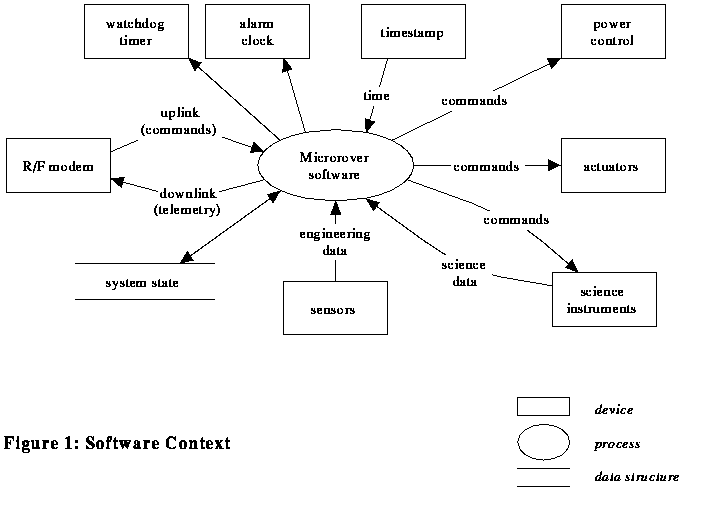
Reference 2.5 describes the rover computer and I/O subsystems. Figure 1 summarizes the interfaces to the rover software.


3.1.3 Software Structure

The rover software consists of a single-threaded control loop, with interrupt handling only for exception conditions (contact sensor, power loadshed, and timeout alarms). The limited processing and electrical power available make a multitasking executive inappropriate, as do the deterministic timing requirements of the direct CCD interface.

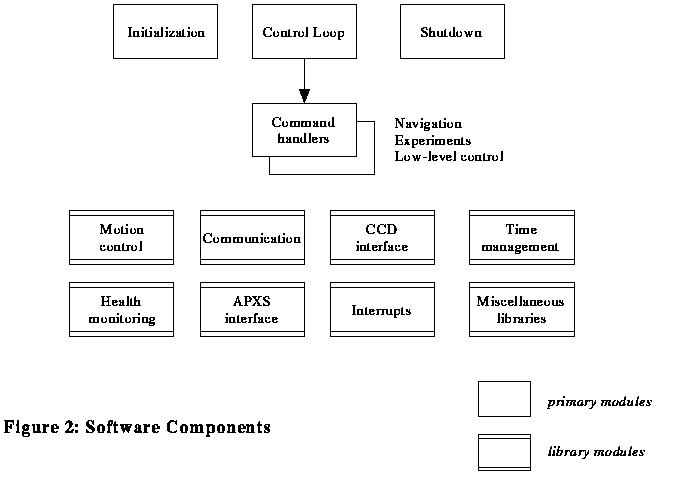
The major software components are shown in Figure 2, and consist primarily of a top-level control loop, a set of command handlers, and libraries of support functions.


The control loop performs periodic functions, requests command sequence uplinks, and dispatches commands to the appropriate handlers. Command handlers have several responsibilities: Command handlers return control to the control loop upon completion of the command.

Library functions are organized into hierarchical layers of capability to support the command handlers and control loop. For example, the waypoint traverse proximity sensing module and the imaging command handler both use the CCD interface module, which in turn uses the low-level I/O module to control the hardware.


3.1.4 Vehicle State Information

A global data structure records the current state of the rover, including:

This structure is divided into volatile and non-volatile parts; a copy of the non-volatile part is updated in EEPROM at every heartbeat during traverses, after the execution of any command that changes the state, and before shutting down power.

The lander coordinate system ("fixed level frame") is defined in reference 2.4.

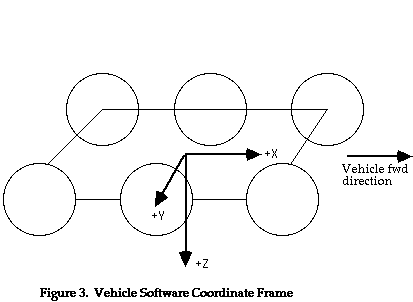
The rover coordinate system is a right-handed, orthogonal, Cartesian frame with its origin at the center of the rectangular plane defined by the four corner wheel centers (when the rover is level). Positive Z is perpendicular to this rectangular plane, pointing down. Positive X coincides with the forward traversal direction. Positive Y is to the rover's right (see Figure 3).


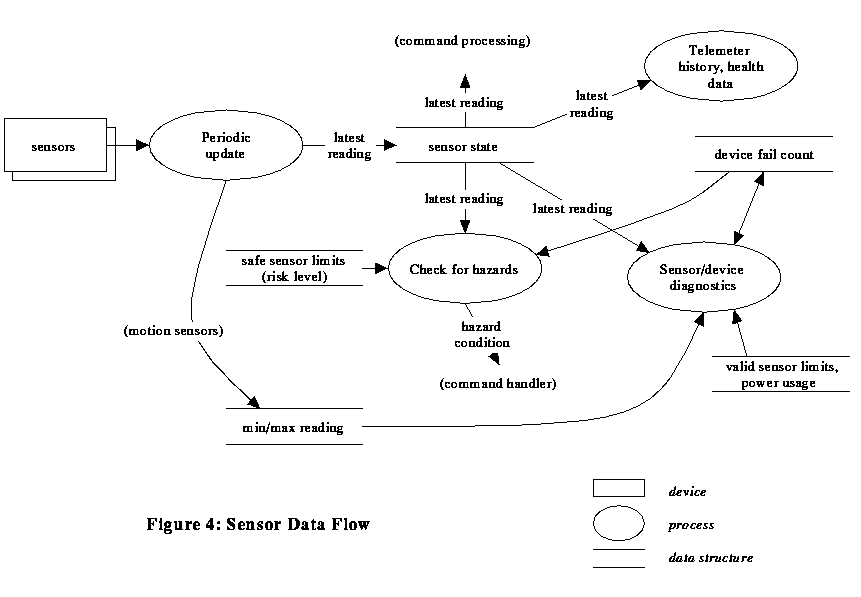
The device failure counts are incremented each time the health check function detects an apparent problem with the associated device, and decremented when the health check determines that it's working properly. They are used to determine whether the corresponding sensor reading is "trusted" (e.g. whether an out-of-range reading is cause for aborting an operation, or whether an alternate sensing procedure should be used if possible). Figure 4 shows how sensor data is handled. If an actuator has failed, the rover doesn't use it. The operator can override this by forcing specific devices into a failed or valid state by command - this allows disabling of devices, including the watchdog timer, and tracking of "spent" one-shot devices (such as the APXS failsafe). The failure count for devices flagged as failed (but not forced failed by command) is decremented once at cold start (morning wakeup) for a "second chance". Failure counts are also used to mark devices that are not to be turned on at all (e.g., shorted), and to indicate devices that are unusable if the 12v analog power supply has failed.


There are several related but distinct "timeouts" associated with rover operation, including: The control parameters are a list of flags, thresholds, calibration factors, etc. that affect the behavior of the software, but don't need unique commands to modify them (i.e. don't require special processing when changed). On the other hand, a more convenient access method than patching is appropriate, so a SET PARAMETER command is provided to update these parameter values. The parameters are defined in the Command Dictionary, reference 2.13. Some particular ones are referred to in this design document:

Note: Values and behaviors that are adjusted by control parameters are indicated in this document with the notation {name}, where name is the parameter name in the Command Dictionary.


3.1.5 Error Handling and Reporting

The rover maintains a set of error state flags, cleared during startup and set when the corresponding conditions occur during command execution. The flags are:


Most commands are skipped if any error flags are set, unless those flags are masked by corresponding error mask bits. Commands are provided to set the error mask, and to clear the error flags (these latter commands, along with "end of sequence", "abort", and "shutdown" commands, are performed regardless of the error state). Skipped commands generate "command acknowledge" telemetry messages indicating that fact.

"Command execution results" telemetry messages (for those commands that generate them) contain a field indicating the error flag values before and after execution of the command.

When the software detects an anomalous condition, it sets appropriate error state flags, and calls an error logging function, passing error information and a severity level (0 = minor, 1 = major, 2 = critical). If the level is at or above the current error reporting threshold {EREP_LEVEL}, the error is noted in a timestamped error message. Any such messages accumulated during execution of a command are sent in a "critical state" error telemetry packet, separate from any normal command telemetry, at the completion of the command.


3.1.6 Arithmetic Standards

Due to the limited capability of the rover CPU, no floating point arithmetic is used. Where necessary, calculations are performed in an appropriate fixed-point notation.

Angles are represented using 16-bit Binary Angle Measurements (BAMs), where 2**16 BAMs = 1 revolution (1 BAM = 0.0055 degrees).

Distances are measured in millimeters.

Time is maintained as a 5-byte binary counter with 4 bytes of "coarse time" (CCSDS time in seconds) and 1 byte of "fine time" (units of 1/256 sec = 3.9 msec = 1 "centon"). Standard subsets of this counter are defined (byte 0 = least significant, byte 4 = most significant):

name# bitsbytes usedapproximate range
Full time400 - 44 msec to 136 years
Long seconds321 - 41 sec to 136 years
Long centons320 - 34 msec to 194 days
Short seconds161 - 21 sec to 18 hours
Short centons160 - 14 msec to 4 minutes


Note that seconds (as well as minutes, hours, etc.) are always "Earth seconds" or "atomic seconds", as opposed to "Mars seconds".


3.2 Components


3.2.1 Initialization

The rover software starts execution from a reset vector when the CPU is reset. This occurs when sufficient power becomes available from the solar panels, or when battery power is switched on by the alarm clock or lander-controlled wakeup switch, or when a watchdog time-out occurs. The reset handler checks for a GSE debug connection; if active, it invokes a debug monitor. It then checks for valid EEPROM contents (where the main rover software is stored); if valid, the main software initialization is invoked. It EEPROM is not valid, a limited rover control program in PROM is started instead. The main initialization function sets up the software and hardware environment, determines the appropriate mission phase, and invokes the main control loop.

The rover distinguishes between a "warm start" (time-out reset or hard device failure) or "cold start" (powerup) by checking a RAM location for a special pattern (stored at the end of initialization code) that should not occur in uninitialized memory. (RAM contents are not used during a warm start except as telemetry data - everything is reinitialized from nonvolatile memory, in case a power glitch left the warm start pattern intact but other locations altered.) Activation of the watchdog and command execution timer is disabled if the devices are marked as failed; the rover automatically marks them as failed (until commanded otherwise) if several consecutive premature time-out resets occur.
	save selected RAM data in case of warmstart
	load persistent state data from EEPROM
	enable loadshed interrupt handling
	turn on CCPS power switch
	initialize power control, turning on 12V converted for analog I/O
	wait until enough power to keep 12V on without loadshed
	determine wakeup cause
	if alarm clock or watchdog timeout
		report timeout error
	if apparent power reset
		report device error
	if coldstart wakeup (alarm clock, solar, or lander)
		decrement failure counts of soft-failed devices
	initialize timer handling
	initialize telemetry packet handling
	if APXS was left on (night mode)
		suspend APXS data collection
		turn off APXS
	if solar wakeup and {batt_usage} doesn't allow batteries for 12V
		turn off CCPS
	wait until enough power to keep 12V and modem transmit on
		without loadshed
	check for automatic mission phase change based on gravity
	if on Mars
		close 3BSS switch to bring all batteries on-line
	if coldstart
		heat modem for {MODEM_HEAT} seconds
	perform clock sync communication with lander
	if unexpected warmstart and possibly valid telemetry data left in RAM
		send telemetry data
	perform {HEALTH_LEVEL} health check
	start control loop


3.2.2 Control Loop

The main control loop checks for and dispatches uplink command sequences. In between (and while waiting for) commands, it monitors periodic tasks, including thermal management, loadshed alarm recovery, automatic health checks, and automatic end-of-day shutdown. The control loop also collects data for the sequence execution report telemetry message sent at the end of each command sequence.

When a command sequence is received by the rover, it is immediately parsed and validated. If any errors are found, the sequence is rejected (on the chance that it was corrupted during transfer from the lander) and re-requested. If still invalid after retrying, the sequence is acknowledged (so that the lander can release it) and valid commands in the sequence are processed. If an invalid command is found during execution (either uncorrected by retries, or invalid by execution-time context), the "invalid command" error flag is set and that command is aborted.

In between command execution (and periodically during wait command execution {CMD_RATE}), the rover checks for a pending command sequence on the lander. If one is present and starts with an Abort command, the rover shuts off all actuators, discards the remainder of the current command sequence, and uploads the new sequence; otherwise, it rejects the new sequence so that the lander will keep it until the rover is ready for it.

Whenever a valid command upload, or a "no commands available" response, is received from the lander, the rover resets its "loss of lander communication" indicator. If it has telemetry data buffered in RAM or EEPROM, it sends the buffered data to the lander and resets telemetry buffering. Receipt of a valid upload resets the "loss of earth comm" indicator (canceling contingency operations if active) and resets the earth communication timeout.


3.2.3 Shutdown

The rover shutdown process is performed:

The alarm clock is set to power the rover back up at an appropriate wakeup time (the commanded time, or the {DEFAULT_WAKEUP} time-of-day). If the APXS is active, data collection is stopped. If night mode collection has been enabled (by {APXS_NIGHT}), the APXS night-mode relay is latched to connect the APXS directly to the battery bus and colection started/continued. Vehicle state information is stored in EEPROM, along with any remaining commands in the current sequence. Batteries are disconnected from the core bus. The processor is placed in an idle loop with interrupts disabled (and the watchdog timer kept reset) to stay in a safe state until solar power drops below the power monitor threshold.

A shutdown command with a wakeup time of zero requests a system reset (warmstart). The rover accomplishes this by forcing a watchdog timeout.


3.2.4 Vehicle Control/Navigation


3.2.4.1 Navigation Modes

A fundamental capability of the rover is to drive around. The software provides several driving modes:

  • Waypoint navigation: semi-autonomous driving to a designated destination position

  • Rock-finding: semi-autonomous driving in search of a rock


    All modes include:


    The primary distinction between the driving modes is the criteria for declaring completion. The waypoint navigation and rock-finding modes also include:


    3.2.4.2 Waypoint Navigation

    This is the normal traverse mode, driving to an operator-designated point while avoiding obstacles. The vehicle travels in small steps (high-rate loop), stopping frequently (due to power limitations) to perform proximity detection and hazard assessment. If a hazard is detected in front of the rover, it turns away from the hazard direction in steps, repeating the proximity scanning until a clear path is found. The vehicle continues on this "avoidance heading" for a short distance, then steers back toward the original destination. Detected hazard conditions are noted in flags in a global hazard state indicator.

    	steer wheels straight
    	do navigation_startup
    	start drive motors (all forward)
    	loop until at destination or untraversable hazard:
    		high_rate loop (until at next stop point):
    			do drive_update
    			check distance to goal
    			do navigation_check
    		end
    		stop wheels
    		if time for heartbeat
    			do heartbeat communication
    		do hazard_avoidance
    		adjust steering toward goal (or along
    				avoidance heading) (Figure 6)
    		restart drive motors
    	end
    	do navigation_stop
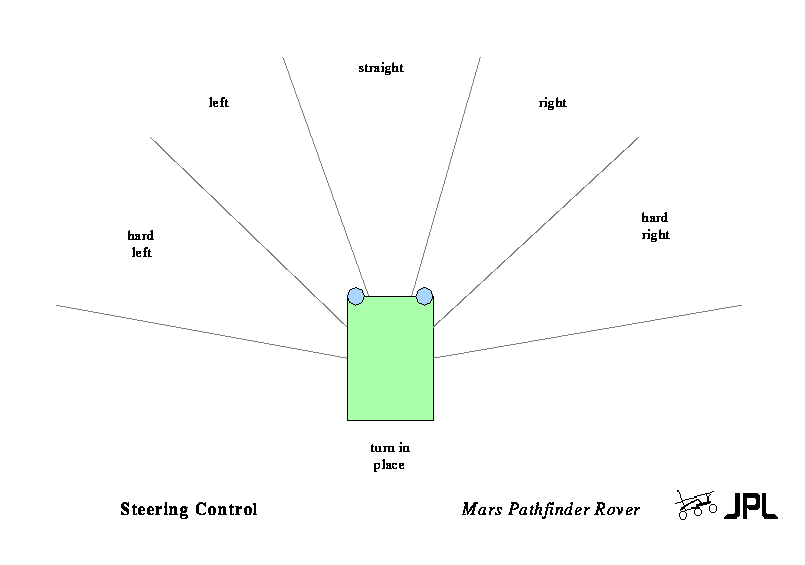


    Figure 6


    3.2.4.3 Rock-Finding Navigation

    This mode starts by driving toward a specified destination, as in waypoint navigation. However, a rock-like obstacle results in completion rather than avoidance. If the waypoint is reached without finding a rock, or a non-rock obstacle is encountered, the rover starts a roughly spiral search pattern. Note that this is not a search for a specific rock, nor a dead-reckoning correction capability.

    The logic is the same as for waypoint navigation, except for adjusting the "destination" for the search pattern, and centering the rover heading between the edges of the rock (using proximity sensing) at completion.


    3.2.4.4 Direct Move Navigation

    In this mode, the vehicle drives continuously at specified steering angles, for a distance specified as encoder counts. This is used for deployment from the lander, and as fallback low-level driving control. If all encoders have failed, the drive distance is approximated based on time.

    	set time limit
    	steer wheels to specified steering angles
    	do navigation_startup
    	start drive motors in specified direction
    	loop until reached destination or hazard
    		do drive_update
    		do navigation_check
    	end
    	stop wheels
    	do navigation_stop


    3.2.4.5 Turn In Place Navigation

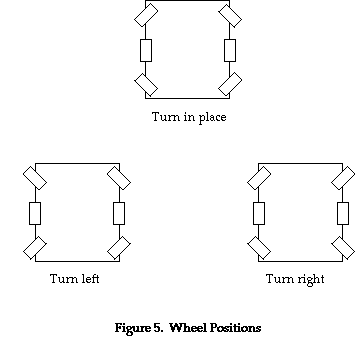
    In this mode, the vehicle spins about its center to change heading. This can be performed on command, or as a step during the waypoint and rock-finding navigation modes. (Odometry or time-based control can be used as a backup if the heading sensor has failed.)

    	set time limit
    	steer wheels to turn-in-place position (Figure 5)
    	do navigation_startup
    	start drive motors (L & R sides in opposite direction)
    		for shortest turn direction
    	loop until about to cross desired heading, or hazard
    		do drive_update
    		do navigation_check
    	end
    	stop wheels
    	do navigation_stop


    3.2.4.6 Position APXS Navigation

    In this mode, the vehicle drives straight back, monitoring contact sensors on the APXS for contact with a rock surface.

    	set time limit
    	steer wheels straight
    	do navigation_startup
    	start drive motors (all reverse)
    	loop until contact, reached travel limit or hazard
    		check APXS contact for done
    		do drive_update
    		do navigation_check
    	end
    	stop wheels
    	do navigation_stop


    3.2.4.7 Unstow (Standup/Bogey Lockup)

    This command function is used to prepare for deployment from the lander. The rover first checks that the lander has released it, as indicated by the APXS contact sensors. Next, the rover drives the two rear wheels (only) to raise the vehicle from the stowed position on the lander, until the bogeys are locked (as indicated by the bogey pot sensors). It then checks for proper latching by trying to back off the rear wheels. Upon successful completion, the mission phase is changed to pre-deployment.


    3.2.4.8 Navigation Support Intermediate Functions

    These functions perform groups of actions common to the various driving modes, as referenced above:

    navigation_startup
    
    	turn on and calibrate gyro
    	turn on accelerometers, LEDs (encoders)
    	initialize contact sensors
    	record telemetry header
    	
    navigation_stop
    
    	turn off accels, contact sensors (gyro is left on for stability)
    	finish telemetry
    	
    drive_update
    
    	scan sensors
    	update dead reckoning
    	update telemetry
    	
    navigation_check
    
    	check timeout
    	check loadshed
    	check lander proximity hazard
    	check for sensors exceeding safe limits (at the current {RISK_LEVEL})
    	check for unmasked contact
    	check motor current (overheat or stall)


    3.2.4.9 Hazard Avoidance

    For direct driving commands, a hazard condition (see navigation_check above) causes the traverse to be aborted, and (optionally) the capture of images of the rover's surroundings.

    For waypoint and rock finding navigation, laser/CCD obstacle proximity detection is also performed, and the rover may be permitted to avoid certain hazards. Proximity hazards are avoided by turning in place until the obstacle is no longer in the way; other hazards are avoided by first backing up and then turning away.


    3.2.4.10 Low-Level Navigation Support